Centrally managed protection for web applications, with NGINX module and dedicated VM deployments
MIST security module
Protect your application at the front door
MIST WAF is a managed Web Application Firewall that inspects incoming web requests before they reach your application and can block requests that match known attack patterns. It can be deployed in two ways: as a module in an existing NGINX installation, or as a complete WAF on a dedicated virtual machine in front of one or more applications.
The service is designed for research and teaching environments that need a consistent security baseline without having to build and maintain a WAF themselves.
Customer benefit: You can be focussed on the application while MIST provides the WAF engine, logging and operational automation, with a programmable way to distribute configuration and rules. Selecting the rules and configuration that are appropriate for your application, keeping them up to date and following up on their effects remain your responsibility, because these choices are application-specific. The MIST team can support you with rule selection, configuration and tuning.
Two deployment options
NGINX module
When NGINX is already installed, the WAF can be used as a module in that NGINX instance. NGINX remains the reverse proxy and passes requests through the ModSecurity engine before forwarding them to the backend application.
Dedicated WAF VM (recommended)
The preferred deployment is a complete WAF on a dedicated virtual machine in front of the application or applications. All requests to the web applications are routed through this WAF, inspected there and then forwarded only when allowed. This deployment provides the complete WAF entry point; logging, dashboards and centralised monitoring are added through the MIST observability stack.
The application backend is kept private and is not directly accessible from outside. Only the WAF VM is exposed to incoming web traffic.
What MIST WAF provides
Request inspection
ModSecurity examines incoming requests and applies centrally managed rules before allowed traffic is passed to the backend service. This can happen in an existing NGINX instance or on a dedicated WAF VM.
Managed security rules
Rules are kept in Git repositories and deployed consistently across projects. The standard generic rule set is always available, with additional MIST rule sets added when needed.
OWASP Core Rule Set
OWASP CRS can be enabled for widely recognised web attack categories such as SQL injection and cross-site scripting. Rule groups can be selected to match the application.
Clear user feedback
Blocked requests receive a dedicated MIST block page. This makes it clear that a security control stopped the request rather than leaving the user with an unexplained server error.
Optional AI Connector
The WAF can periodically analyze ModSecurity events stored in Loki with an OpenAI-compatible language model and write a concise Markdown security report back to Loki. Reports can be viewed in Grafana. This feature is disabled by default and requires a reachable LLM endpoint and securely stored API key.
What MIST WAF does — and does not do
What it does
Inspects incoming web requests through the ModSecurity WAF engine.
Applies the rules and configuration selected for the application, and can block matching requests.
Provides a separate audit log and can integrate with Promtail, Loki and Grafana for monitoring.
Automates the installation, validation, refresh and distribution of WAF configuration and rules.
Provides guidance and support with rule selection, configuration and tuning when needed.
What it does not do
It does not automatically determine which WAF rules are suitable for your application or guarantee that AI-generated reports are correct.
It does not replace your responsibility to select and review application-specific rules and configuration.
It does not replace secure application development, vulnerability testing or application-level access control.
It does not replace network firewalls, and bot detection, rate limiting, high availability integration are outside the current scope.
Your team remains responsible for understanding the application's behaviour, evaluating rule matches and reviewing AI-generated reports before taking action. MIST operates the WAF platform and can assist with this work.
How configuration and rule changes are made
Configuration and rule changes follow a controlled, reviewable process. Customers remain responsible for identifying the changes their application needs, while MIST reviews and deploys approved changes.
Option 1: Merge request on gitlab repo
MIST Team grants the customer access to the relevant Git repository.
The customer creates a sub-branch and makes the required configuration or rule changes there.
The customer opens a merge request for review.
MIST Team checks the changes and deploys them when they are approved.
Option 2: Change request on hjelp.uib.no
The customer submits a request describing the required configuration or rule change in hjelp.uib.no.
MIST reviews the request, discusses the application-specific requirements where necessary and implements the change.
The change is deployed after it has been reviewed and approved.
Changes are not made directly in the deployed configuration. This keeps the change history auditable and ensures that configuration and rules are validated before deployment.
Choose a safe rollout path
1. Observe first
New applications can start in DetectionOnly mode. The WAF records rule matches without blocking requests, allowing the team to identify legitimate application behaviour and tune the rollout.
2. Enforce protection
Once the results have been reviewed, the WAF can run in blocking mode. Requests that match active rules are stopped before they reach the backend.
The operating mode is configured for the WAF installation as a whole. Per-rule or per-application modes are not part of the current version.
Operated as part of MIST
Infrastructure as Code: Ansible installs and configures the WAF reproducibly.
Controlled rule changes: rule repositories are managed in Git, with changes traceable to their source.
Automatic refresh: configured repositories are checked every 30 minutes; NGINX is reloaded only when rules change and its configuration test succeeds.
Separate audit trail: WAF events are written to a dedicated audit log that can be shipped with Promtail to Loki and viewed in Grafana.
Safe platform integration: the role restores required SELinux contexts and keeps WAF configuration separate from application configuration.
In a module deployment, NGINX remains responsible for the reverse proxy, TLS and virtual hosts. In a dedicated VM deployment, the WAF provides the external entry point and routes allowed traffic to private application backends. MIST WAF focuses on inspection, rules and security logging; dashboards and optional AI reports use the MIST observability stack.
Optional AI security reports
As an optional feature, MIST WAF can analyse ModSecurity events stored in Loki. By default, it uses UiB AI KIX, but any other OpenAI-compatible API can be configured instead. The analyzer sends a configurable reporting period to the selected endpoint and writes a periodic security report back to Loki for viewing in Grafana.
The feature is disabled by default and requires a reachable Loki instance, an OpenAI-compatible LLM endpoint and an API key stored securely in Ansible Vault. It supports security analysis and reporting; it does not replace the WAF rules or automatically block requests.
How traffic is protected
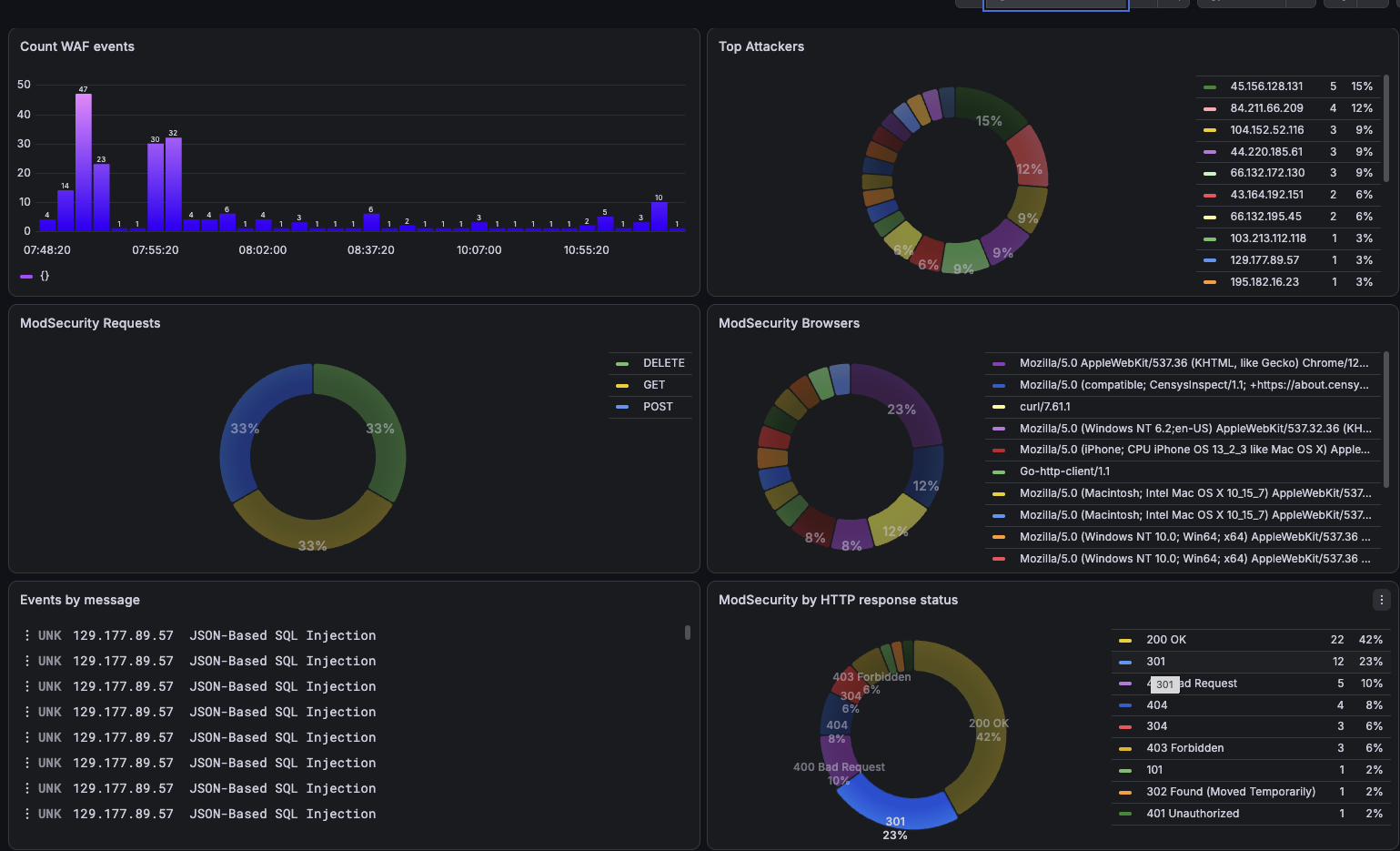
WAF activity can be made visible through the MIST observability stack.
A visitor or service sends a request to the WAF entry point.
NGINX receives the request and passes it through the ModSecurity WAF engine.
Managed MIST rules and, where enabled, OWASP CRS inspect the request.
Allowed requests continue to the backend; matching requests are blocked and recorded.
With a dedicated WAF VM, this design can protect multiple applications on different virtual machines and projects while keeping their backends private and inaccessible from outside.
Is MIST WAF right for your service?
MIST WAF currently supports NGINX on AlmaLinux 10. For the module deployment, NGINX must already be installed and configured as a reverse proxy; the WAF role does not install NGINX itself. A dedicated WAF VM provides the external reverse proxy and can route traffic to private application backends. Private rule repositories require a GitLab read token stored securely in Ansible Vault. The optional AI reports additionally require Loki WAF events, a reachable OpenAI-compatible LLM endpoint and an API key stored in Ansible Vault.
The WAF complements, rather than replaces, network firewalls. Firewall configuration, bot detection, rate limiting, high availability and Kubernetes integration are outside the current scope.
Good fit: web applications that need centrally operated request filtering, a clear security baseline and an auditable path from rule change to deployment.
Discuss your application
To discuss onboarding, rule requirements or the right rollout mode, contact the MIST team at nrec-vb@uib.no.